
See Exactly Which YouTube Videos Make You Money
In under one hour, learn a simple setup that shows you exactly which YouTube videos drive clicks, leads, and sales on your website.
>>>or scroll down to learn more
No analytics background required
Your YouTube Channel is Sending You Traffic
But You Have No Idea Which Videos Are Actually Making You Money
In under one hour, learn a simple setup that shows you exactly which YouTube videos drive clicks, leads, and sales on your website.


You sell something, capture leads or book calls directly from your website
You do not send traffic off of YouTube. Your main goal is to keep them on YouTube
You run a YouTube channel that links direct to your website
Your goal is only views, likes or subscribers
You have Google Analytics setup on your website (or you'll add it)
You do not convert visitors on your website
You want clarity without becoming an analytics expert
You want advanced or complicated analytics setup
Why Youtube analytics is not enough.
YouTube Analytics only tells you part of the story.
But the moment someone leaves YouTube and hits your website, the data breaks.
You might know YouTube is sending traffic. You potentially do not know:
Which specific video sent it
Which link they clicked
Which videos actually convert into leads or customers
So you keep guessing... You keep making content without knowing what truly works.

You sell something, capture leads or book calls directly from your website
You run a YouTube channel that links direct to your website
You have Google Analytics setup on your website (or you'll add it)
You want clarity without becoming an analytics expert
You do not convert visitors on your website
Your goal is only views, likes or subscribers
You do not send traffic off of YouTube. Your main goal is to keep them on YouTube
You want advanced or complicated analytics setup
This happens because most YouTube links are missing one small thing.

Without simple tracking tags on your links, all YouTube traffic looks the same inside Google Analytics.
A video with 5,000 views and a video with 500 views look identical.
You cannot tell what type of videos are driving real results.
You cannot optimize what is already working.
You may be wasting time on videos that never convert into customers.
What Your Analytics Look Like Before and After Proper Tracking
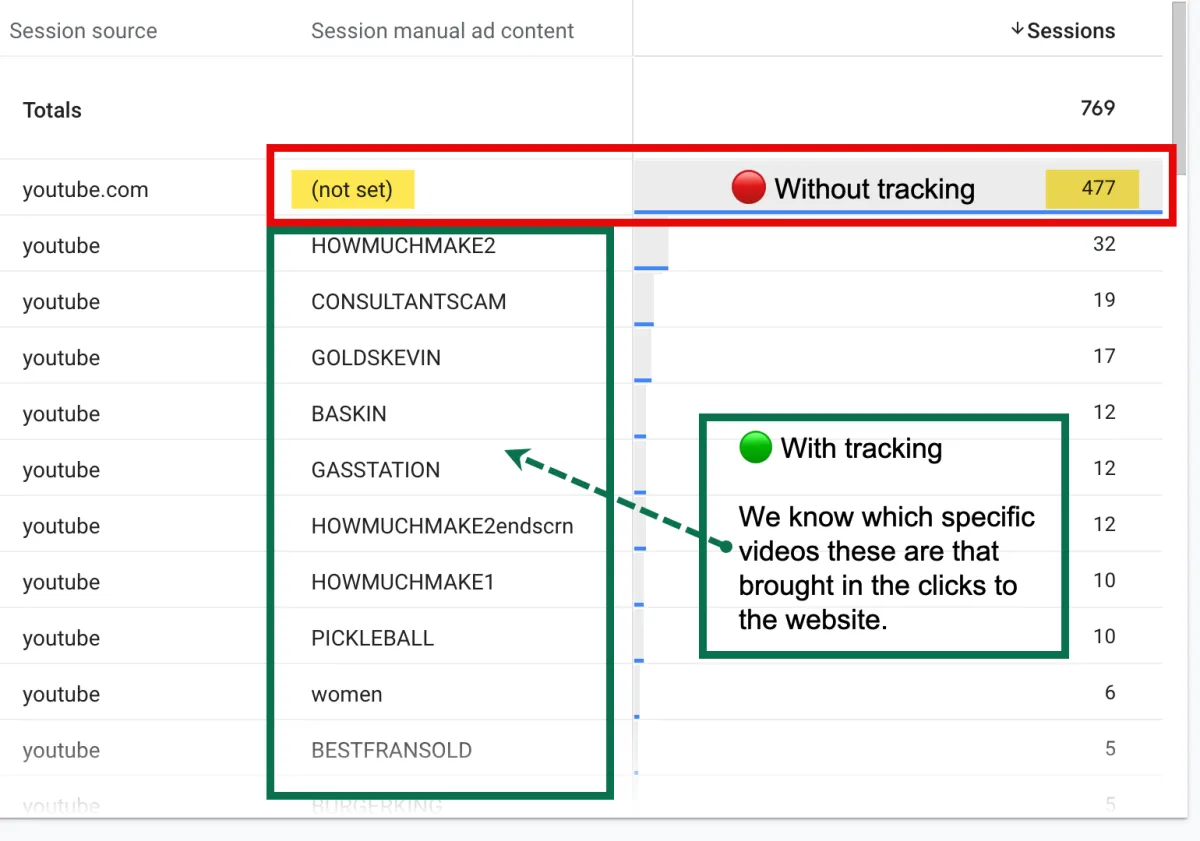
This is a real Google Analytics report from a real website.
On the top row, you’ll see YouTube traffic marked as “(not set)” — meaning Google knows visitors came from YouTube, but has no idea which video sent them.
Below that, you’ll see traffic where simple tracking tags were added. Now we can see exactly which videos drove clicks to the website. Same traffic source. Completely different level of clarity.
What You Will Learn

What a UTM code is and why it matters
How to create a UTM link in minutes
Where to place links inside YouTube
Where to look in Google Analytics to see results
How to categorize tags to know exactly which video drove the click
How to connect traffic to actual conversions
What Do I Need?

YouTube Studio
You'll need edit access to your YouTube channel. You'll need to be able to edit all old and new videos, so read-only access will not work. Once you know the format, you can have someone on your team do it for you.

Google Analytics
You actually won't need to "set up" anything in Analytics to be able to see which YouTube videos are getting clicks. But this is where we will go to see the results once completed.

Website
You will need to make sure your Google Analytics is connected to the backend of your website. This is how the UTM codes are tracked. If Analytics is not on your website, none of this will work.
Ready to get started?
Time Commitment - Less Than 1 Hour!!
You can do all of this even on old videos.
If you have 5 videos or 500+, you can start tracking them today.
You cannot see past data, but you can finally see what works moving forward.
You do NOT need to be an analytics expert. I'll show you everything.
Special Offer
limited-time promotion
ONLY $47
Original Price: $197
MONEY-BACK GUARANTEE
100% Satisfaction Guarantee
If you're not fully satisfied with our course, we offer a 30-day money-back guarantee. No questions asked. Your satisfaction is our priority!

Frequently Asked Questions
How long do I have access to the course?
As long as the course is live, you'll have access! If the company decides to shut down in the future, the videos will be emailed to you with all instructions before that happens so you'll have all of the information you need for as long as you need it.
Do I need any prior knowledge of Google Analytics and YouTube?
No. If you're here, you likely already have a YouTube Channel. If not, and you're just starting one that's perfect too. All you need to have is access to the YouTube Editor section of your Channel where you can edit videos. You'll also need to make sure that Google Analytics is installed on your website. Not sure? That's ok, I'll go over that first thing in the video and you can pause to double check.
Will I be able to implement this right away?
Yes! Once you understand how UTM codes work, you'll be able to get this implemented today! If you only have a handful of videos, it'll just take you a few minutes. If you have hundreds of old videos, we suggest that you start with your top performing, or most viewed videos first and work on this when you have extra time. Once you've created your categories and naming conventions, you'll be able to do each individual video in a matter of minutes.
Is there any support available if I get stuck?
Yes! Feel free to email us any time at [email protected] and we will help.
Ready to FINALLY see which videos are converting?
Enroll today and start implementing immediately. You can be done in less than 1 hour.